Tasmota AlarmCamSirena Module
Burglaries are happening more and more often. Not only in detached houses, but also in apartment buildings. Burglars act quickly. While two cars stand in the parking lot, ready to speed away, two people go up the stairs of an apartment building to an apartment whose residents they have observed for a long time and whose daily routine they know. Using a crowbar, they quickly bend the front door, rush through the entire apartment, and grab only the most valuable things that catch their eye. Or, knowing exactly where the person keeps valuables and jewelry, they don't waste any more time. Then they hand over the loot to the driver of the first car and drive off in the second.
The police can only shrug. Not only is it unclear who broke in and when, but there is also little witness testimony. Neighbors, even if they heard a faint pop, don't pay much attention. It's good if insurance covers the loss.
The main purpose of this module is to turn on a siren when a door or window opening sensor is triggered. The sensor is a reed contact, which is placed next to a window or door. A magnet must be placed opposite the sensor. When the door is closed, the magnetic field holds the sensor contacts together. When the door opens, the sensor contacts open and the module turns on the siren.
The siren sound is not continuous: two seconds of alarm, then a half-second pause. This cycle repeats until the siren is turned off either by software or manually.
An additional goal may be to activate one or more IP cameras, which can help the police identify not only the perpetrators but possibly also license plate numbers.
Module Installation
Power Supply and Device Registration in Your Wi-Fi Network
Prepare a mobile phone, tablet, or computer capable of connecting to a Wi-Fi network and place them next to the module. When the device is turned on for the first time, an access point will be enabled a short distance from the module to configure the module's Wi-Fi connection. Then connect the power supply and plug it into the outlet.
The access point will be active for 180 seconds and will have the name tasmota-XXXXXX-YYYY. You need to connect to it.
Then open a browser and go to http://192.168.4.1/.
In this dialog, select your network and enter the network password. After pressing Save, the device will attempt to connect to the router. If successful, the browser will display the IP address assigned to the device – make a note of it.
The device will then be accessible in the same browser window or via the new address (in the example: http://192.168.0.222/).
Testing the Siren
Connect the siren to the device as shown in the picture below:
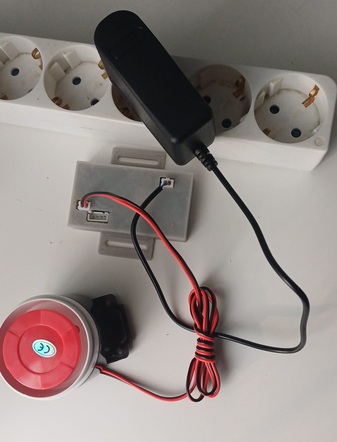
Now when you set Toggle 2 to On, the siren will be active. The Off position turns the siren off.
Connect the sensor to the module, bring the magnet close to the reed contact, and set Toggle 1 to On.
Now if you remove the magnet, the siren will become active. Bringing the magnet back to the reed contact should not turn off the siren. It will only turn off when you set Toggle 1 to Off.
The device is working and can be mounted near a door or window.
Links
\